
Production Engineering
Automated CAD marking prep replaces an 8-hour weekly manual task
Anonymous manufacturing case · Production Engineering
Before laser marking, one person opened each CAD file by hand and placed the part or project number themselves, a task of roughly 8 hours a week. The system now detects ready work by itself and proposes a spatially valid marking position.
Our approach
We started from the signal: which work is ready according to the ERP and the project list. The GEO or IGS source is then resolved through the index, with a limited live check for files that were just created, and every item gets one of three outcomes: an existing GEO, a new IGS or a review case. Work is processed and grouped per list, so a list is reviewed as a whole. The hardest part was the spatially valid marking position: on a bent face the marking has to keep clearance to holes, edges and bend lines, and the correct outside face must be preserved.
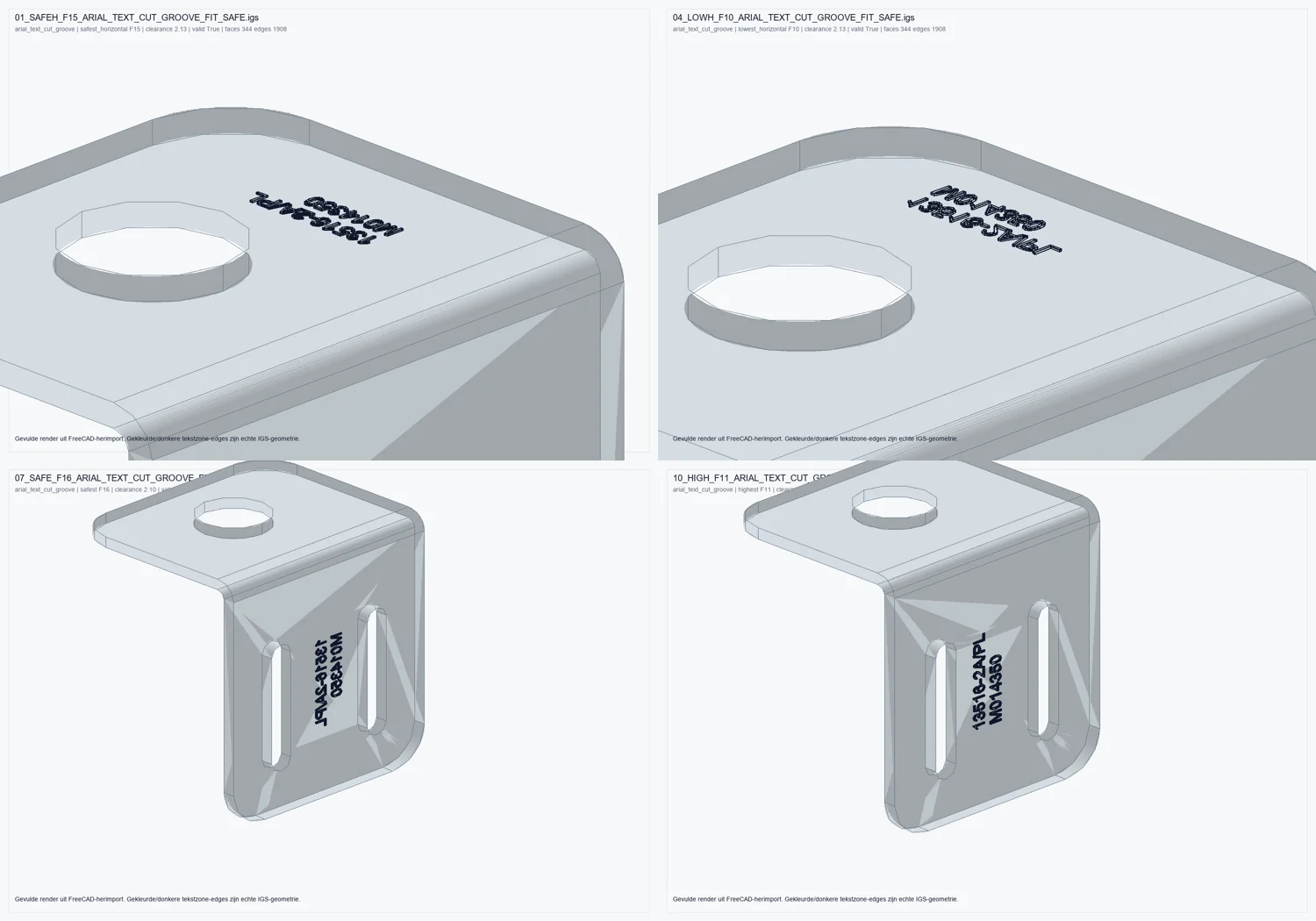
The programmer reviews one traceable result per list instead of building every marking by hand.
Before Cognima
- Manually open each CAD file and judge the correct marking face
- Hand-place the part/project number, checking clearance to holes and bends
With Cognima
- Ready work is detected automatically from ERP and project signals
- Marking geometry is placed automatically within validated safety limits
- Delivery model
- Desktop-first operator workbench
- Human oversight
- Programmer verifies every result in CAD/CAM first
- Data & IP
- Source CAD files stay read-only throughout